

Avaya Phone System Replacement in Canada: CS1000 and Older Systems
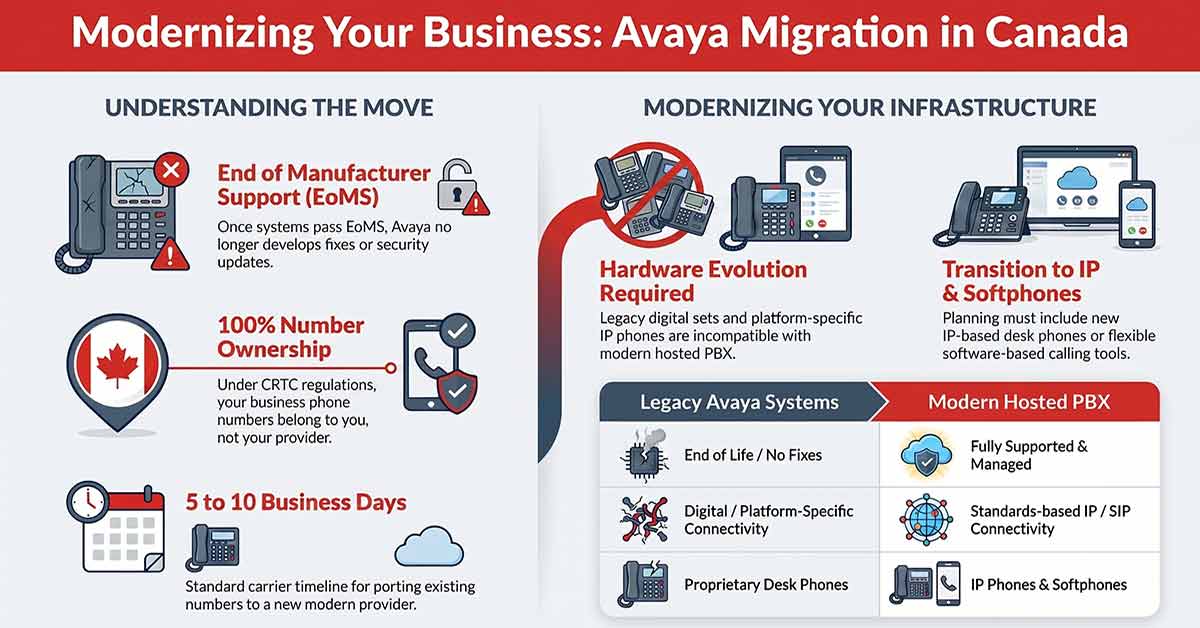
If you’re running an older Avaya phone system in Canada, a Communication Server 1000 (CS1000), an Avaya Definity, or an older Avaya Aura / Communication Manager release, this article is for you. It covers when Avaya phone system replacement becomes the practical path, and what migrating off these systems involves.
One clarification up front: this article is about older Avaya systems that have passed manufacturer support. Avaya is still an operating company that sells and supports current products. The point here is narrower, that specific older systems have reached the end of Avaya’s support lifecycle, and what that means if you’re still running one.
What the lifecycle record actually says
Avaya runs a structured product lifecycle. A release moves from End of Sale to End of Manufacturer Support (EoMS), after which Avaya no longer develops fixes for it. Several older systems have passed that point.
The Communication Server 1000 (CS1000) is the clearest case for Canadian businesses, because it is the former Nortel enterprise platform that Avaya inherited and continued to support. Avaya ended its sale in 2018 and ended manufacturer support in 2019. Older Avaya Aura / Communication Manager releases have passed the same milestone, and even older systems such as Avaya Definity have been out of manufacturer support for many years.
| Event | Date |
|---|---|
| Communication Manager 6.3 reaches End of Manufacturer Support | July 9, 2018 |
| Communication Manager 7 reaches End of Sale and End of Manufacturer Support (with the Communication Manager 8 release) | 2018 |
| Communication Server 1000 (CS1000, former Nortel) End of Sale | April 9, 2018 |
| Communication Server 1000 reaches End of Manufacturer Support | April 9, 2019 |
| CS1000 End of Services Parts Support | June 1, 2024 |
This list is specific to older releases. Avaya’s newer releases remain current and supported, so reaching end of support is a per-system question, not a statement about the brand. If you are running one of the systems above, the operational situation has changed in ways worth understanding.
What “no manufacturer support” means in practice
Past End of Manufacturer Support is not a paperwork milestone. It changes what you can do when something on the system breaks.
- No new patches, fixes, or security updates. Once a release reaches EoMS, Avaya no longer issues bug fixes or security updates for it. If a new vulnerability is identified, the manufacturer’s resolution is to move to a current release, not to patch the old one. A system exposed to the public internet for remote users or SIP trunking carries the cumulative risk of years without security updates.
- Parts on a best-effort basis only. After EoMS, hardware repair and replacement are handled on a best-effort basis, and components become increasingly scarce over time. For CS1000 specifically, even services parts support ended in June 2024.
- End-of-life endpoints. The phones built for these platforms followed the systems out of support. The CS1000’s 1100 Series IP deskphones, for example, are themselves end of sale with no direct manufacturer replacement.
- Declining specialist availability. Technicians trained on CS1000 and older Aura programming continue to leave the field. Shops that still service these systems exist, but the bench narrows every year.
The operational question is not whether the system works today. It is what happens the day a component fails or a security issue surfaces, and the manufacturer’s answer is to move to a current platform anyway.
Migration considerations
Avaya phone system replacement follows a well-established path to a modern phone system. A few specifics are worth knowing before you start:
- Your phone numbers stay with you. Under CRTC regulations, your business phone numbers belong to your business, not to your current provider. Porting to a new provider does not require carrier permission and is independent of any contract status. Porting timelines depend on carrier approval and typically run 5 to 10 business days at the carrier level.
- Most older Avaya and former-Nortel endpoints are not built for a modern hosted PBX. Digital sets from these systems, and platform-specific IP phones like the CS1000’s 1100 Series, were built for their own call-control platforms and do not carry to a modern IP-based hosted PBX. Migration planning should assume new IP desk phones, softphones, or a mix of both.
- Proactive migration costs less than emergency replacement. Planning a migration on your own timeline allows for staff training, parallel running, and a clean cutover. Replacing a system after it fails compresses all of that into days rather than weeks.
What changes when you move to a modern hosted PBX
Avaya phone system replacement is ultimately an architectural shift, and the shift is the point. A CS1000 or older Aura system is hardware in your equipment room. A modern hosted PBX moves the system into the provider’s infrastructure, leaving only desk phones and softphones at your sites. Adding lines, adding extensions, adding a second location, and adjusting call routing become configuration changes in software rather than hardware orders.
Infrastructure ownership across Canadian providers varies in ways worth asking about. Some providers operate their own dedicated physical infrastructure with direct carrier connectivity. Others resell capacity from another provider on shared infrastructure, adding a layer between you and the call path. Others run on shared virtualized platforms where capacity is allocated dynamically across tenants. The categories are not mutually exclusive, and they affect call quality and reliability differently.
Contract structure varies similarly. Traditional phone lines were typically sold under multi-year contracts with early termination fees and annual price escalation clauses. Most VoIP providers in Canada also require annual or multi-year contracts. Some, like AgileIP, operate month-to-month with no termination fees, shifting the retention model from contractual obligation to ongoing service quality.
How AgileIP fits
Some providers, like AgileIP, operate their own dedicated physical infrastructure, with installation, system configuration, number porting, and staff training included on every line. For a business migrating off a CS1000 or an older Aura system that is past manufacturer support, the managed deployment model removes the operational burden that often kept the legacy hardware in place. Pricing is per concurrent line rather than per user, which typically produces lower total cost as a business grows.
If you’re running an older Avaya or former-Nortel system and want to understand what a migration looks like for your specific configuration, contact AgileIP for a free consultation, no obligation, no pressure.
Frequently asked questions
It depends on the system. Older releases have passed End of Manufacturer Support: the CS1000 in 2019, Communication Manager 6.3 in 2018, and Communication Manager 7 in 2018. Once a system is past EoMS, Avaya no longer issues fixes or security updates for it, and parts are handled on a best-effort basis. Avaya’s newer releases are still supported, so the answer turns on which system and release you are running.
No. Avaya continues to operate and sells and supports current products. This article is about specific older systems that have reached the end of Avaya’s support lifecycle, not about the company. The reason to consider a migration is the support status of the system you are running, not the status of the vendor.
Yes. Under CRTC regulations, your business phone numbers belong to your business and can be ported to any provider regardless of your current contract status. Porting timelines depend on carrier approval and typically run 5 to 10 business days at the carrier level.
In most cases, yes. Digital sets and platform-specific IP phones built for the CS1000 or older Aura systems, such as the 1100 Series, were designed for those platforms and do not work on a modern IP-based hosted PBX. Migration planning should assume new IP desk phones, softphones, or a mix of both.
It means the manufacturer no longer develops the software or produces parts for that release. No new bug fixes, no security updates, and hardware repair only on a best-effort basis. If a new security vulnerability is found, the manufacturer’s resolution is to move to a current release rather than patch the old one.
A planned migration from a CS1000 or older Aura system to a modern hosted PBX typically runs a few weeks from decision to cutover, depending on number porting timelines and the complexity of your existing call routing. Emergency replacements after a hardware failure compress the same work into days and remove the option of parallel running.
YOU MIGHT BE INTERESTED IN:
We offer free consultations to assess your needs and help you make an educated choice.