

Can My Business Phone Number Ring on My Cell Phone?
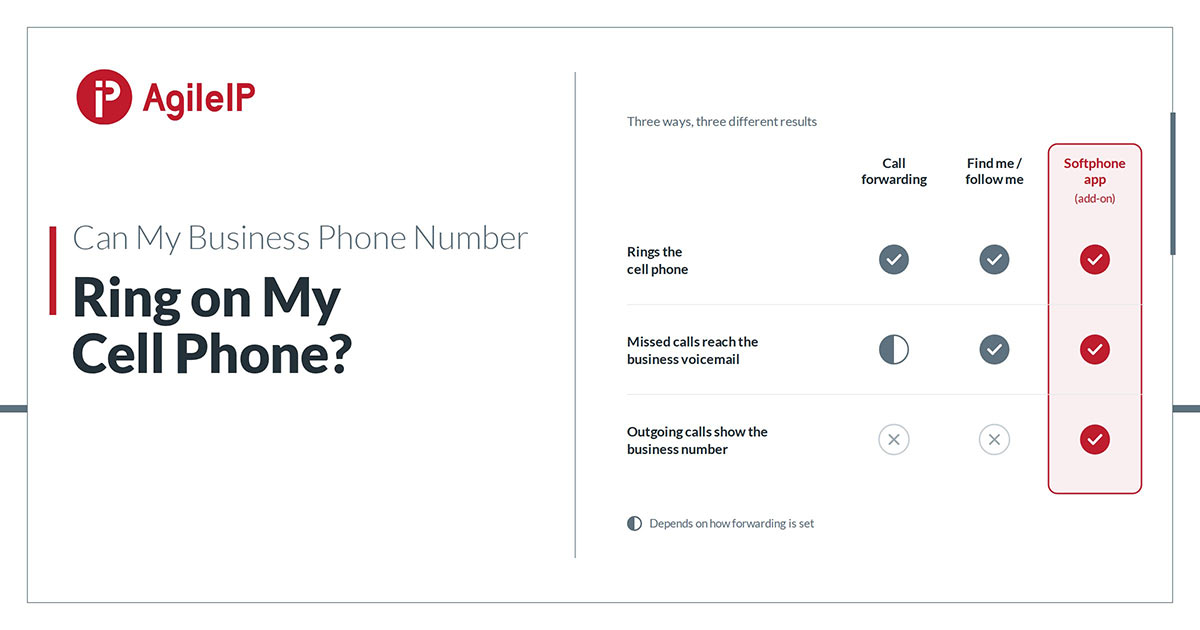
Yes. A business phone number can ring on a cell phone in three different ways, and the difference between them matters more than most owners expect. Call forwarding sends the call to the cell phone. Find me / follow me rings the desk phone and the cell phone in an order the business chooses. A softphone app puts the business line itself on the phone, so calls in and out both use the business number. This guide explains what each option does, what it does not do, and which one fits which situation. A fourth route, for a business that has no phone system at all, is covered at the end.
Option 1: Forward business calls to a cell phone
Call forwarding is the simplest answer. Calls to the business number are sent on to a cell phone number: always, only when the desk phone is busy, only when nobody answers, or on a schedule, such as evenings, weekends, or the two weeks the office is closed. On a VoIP phone system, call forwarding is changed by asking the provider, not by booking a technician.
Forwarding has limits worth knowing before relying on it. Once the call reaches the cell phone, it is an ordinary cell call. Calling the customer back shows the personal cell number, not the business number. The call cannot be transferred back to a colleague at the office or placed on hold with the business greeting. And if the cell phone does not pick up, the message may land in the personal voicemail rather than the business voicemail, depending on how the forwarding is set. Forwarding suits an owner who wants to stay reachable during a specific window, not someone who runs the business from a cell phone all day.
Option 2: Ring the desk phone and the cell phone together
Find me / follow me keeps the call on the business phone system while it looks for the person. The desk phone rings first, then the cell phone after a chosen number of seconds, or both ring at the same time. If nobody answers anywhere, the caller reaches the business voicemail, and with voicemail delivered by email, the message arrives in the inbox as an audio file within moments.
This is the right fit for people who are in and out of the office all day. The office phone still works normally when they are at their desk, and the cell phone catches the call when they are not. The same limit as forwarding applies to outgoing calls: a call placed from the cell phone’s own dialer still shows the personal number. Call forwarding, find me / follow me, and voicemail with email delivery are all included with every AgileIP line; see the full list of included phone system features.
Option 3: Put the business line on the phone with a softphone app
A softphone is an app that turns a cell phone, tablet, or computer into an extension of the business phone system. Incoming calls to the business number ring the app. Calls placed from the app show the business number as caller ID, so the personal cell number stays private. Hold, transfer to a colleague, and business voicemail all work the same way they do from a desk phone, because the app is a desk phone in software. It works over Wi-Fi or mobile data across Canada.
This is the option for anyone who actually works from the cell phone: owners on job sites, sales staff between appointments, a receptionist covering the line from home. It also draws a clean boundary. Do-not-disturb scheduling stops business calls from ringing the personal phone after closing, so the phone stays personal in the evening, and unanswered calls still reach the business voicemail. The AgileIP softphone runs on Android, iOS, Mac, and PC, is set up by scanning a QR code with one-time-use credentials rather than typing in settings, and is available as an add-on to any AgileIP line.
Option 4: One number that rings several phones, without a phone system
A business that has no phone system, and does not want one yet, has a fourth route. Single Number Reach is a business number that rings every phone set up behind it at the same time: an office line, the owner’s cell phone, a partner’s cell phone. Whoever answers first takes the call, the other phones stop ringing, and a call nobody answers goes to a single voicemail box instead of being scattered across several. Calls that come through it show a caller ID prefix, so the person answering knows it is a business call before picking up. It handles two calls at the same time; a caller who arrives while both are in use reaches the voicemail box, and more simultaneous calls are available as an add-on. It is offered as a standalone service, so a one-person business can have a local business number that follows them without buying a phone system. The trade-off is the same as forwarding: with no app or business line on the device, outgoing calls from the cell phone show the personal number. Details are on the Single Number Reach page.
Which option fits
- Forwarding fits a single person who needs to be reached during a defined window and does not make many outgoing business calls from the cell phone.
- Find me / follow me fits people who split their day between a desk and everywhere else, and who want the office voicemail, not the cell voicemail, to catch what they miss.
- A softphone app fits anyone whose cell phone is their main business phone, anyone who needs outgoing calls to show the business number, and any business that wants staff to keep one device without giving out a personal number.
- Single Number Reach fits a very small business with no phone system that wants one local number ringing two or three phones at once, with one voicemail box behind it.
The first three can be combined on one phone system. A common setup is a softphone for the people who live on their cell phones, find me / follow me for the people who float, and scheduled forwarding to an on-call person for after-hours coverage.
How this is set up on AgileIP
Every AgileIP line includes call forwarding, find me / follow me, and voicemail with email delivery, configured by AgileIP as part of the installation and adjusted on request afterward. The softphone is available as an add-on: a new user scans a QR code and the business line is on their phone, with no hardware to ship and no settings to type. Service is month-to-month, with no multi-year lock-in and no penalty for leaving; AgileIP keeps a customer’s business by earning it, with call quality and service, every month. A quote request puts a line count and a configuration to the setup, with no obligation attached.
Frequently asked questions
With a softphone, no. The caller dialed the business number and reached the business number; nothing about the call tells them which device answered. With forwarding, the call itself is seamless, but if it goes unanswered and the personal cell voicemail picks up, the caller will hear a personal greeting instead of the business one.
Yes. Scheduled forwarding and find me / follow me can be limited to business hours, and the softphone has do-not-disturb scheduling so the app goes quiet at closing time. In every case, calls that arrive outside the schedule go to the business voicemail rather than being lost.
With find me / follow me or a softphone, the caller reaches the business voicemail and the message is delivered by email, so it can be picked up from any device. With plain forwarding, the outcome depends on how the forwarding is configured: without care, the message can end up in the personal cell voicemail.
No. A softphone app uses the phone’s data or Wi-Fi connection, so one phone carries both the personal number and the business line, and the two stay separate.
YOU MIGHT BE INTERESTED IN:
We offer free consultations to assess your needs and help you make an educated choice.